Sign operators in with their Google account, while DMARC Analyzer keeps deciding what each of them may see. Read how SSO fits together first if you have not — this page is only the Google-specific half.
Testing this needs a real Google Cloud project and a real deployment reachable over HTTPS from the very first attempt — there is no local dev container to stand up first, so plan on testing against wherever you are actually deploying.
Create a Google Cloud project
console.cloud.google.com/projectcreate. Any name — a dedicated project for this keeps it separate from anything else in your account.
Configure the OAuth consent screen
APIs & Services → OAuth consent screen (branded “Google Auth Platform” in Google’s newer console).
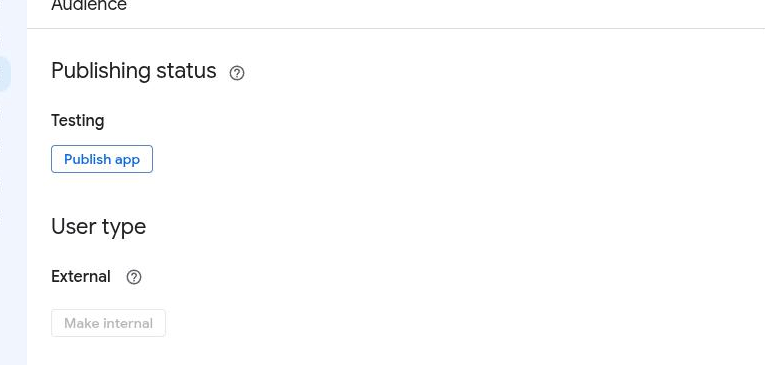
- User type External, unless the project sits under a Google Workspace organisation and you deliberately want it restricted to that org.
- Publishing status: leave it on “Testing” while you’re setting this up. That skips Google’s app-verification process entirely — the trade-off is that only accounts you explicitly add under Audience → Test users can sign in. Add your own account there, or the consent screen refuses you too.
Create the OAuth client
APIs & Services → Credentials → Create Credentials → OAuth client ID, type Web application. Add one Authorized redirect URI:
https://dmarc-analyzer.agency.tld/api/v1/auth/oidc/callback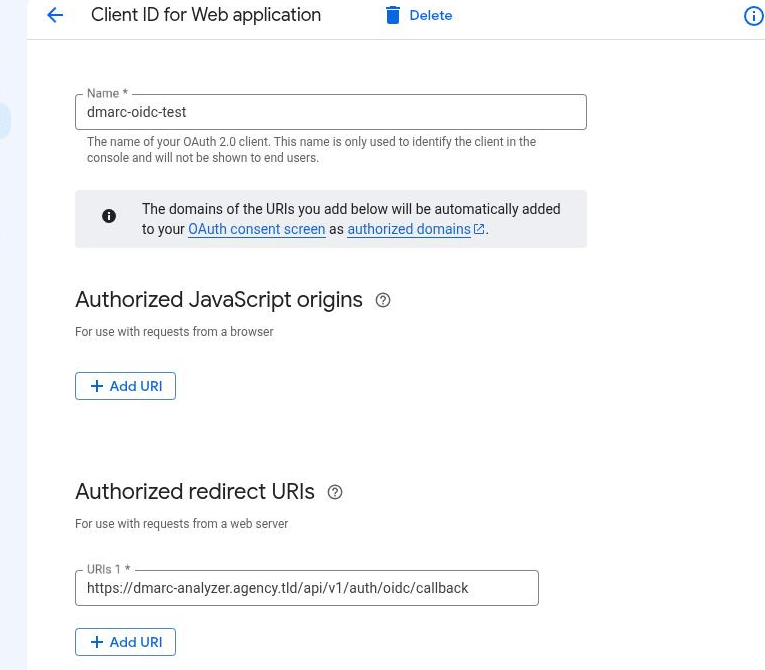
Google’s issuer is fixed at https://accounts.google.com — there is no
per-project or per-tenant path to add to it.
The client secret is shown exactly once
Copy it now, and copy it correctly. There is no way to inspect a client’s existing secret afterward. Close that one-time reveal dialog before it’s copied — or transcribe it with even one character wrong — and there is no way back. The console says so plainly if you go looking afterward: “Viewing and downloading client secrets is no longer available.”
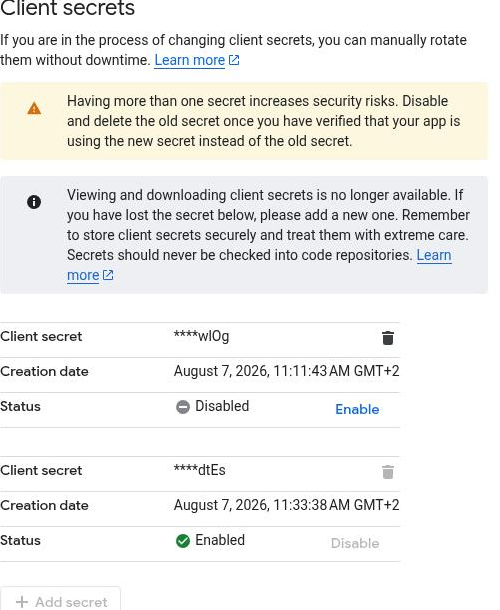
If that happens, there’s no recovery, only rotation: open the client, use Add secret to generate a new one, update your deployment, confirm a real login succeeds, then Disable — not delete — the old one. Disabling is reversible if you got the rotation wrong somewhere; deleting is not.
Configure DMARC Analyzer
environment:
  Auth__Oidc__Enabled: "true"
  Auth__Oidc__Authority: "https://accounts.google.com"
  Auth__Oidc__ClientId: "<client-id>.apps.googleusercontent.com"
  Auth__Oidc__ClientSecret: "<client-secret>"
  Auth__Oidc__DisplayName: "Google"
  Auth__Oidc__AutoProvision: "false"
Restart and the login page gains the button. What happens on the first sign-in is the same for every provider.
Behind a reverse proxy, set
Network__UseForwardedHeaders. You’ll hit this before you even reach a sign-in prompt — see below.
The redirect-URI trap you’ll hit first
Because Google requires a real HTTPS redirect URI, testing it means going live behind a real reverse proxy or ingress from the very first attempt. The app has to get the scheme of its own redirect URI right before Google ever shows a sign-in prompt.
Without Network__UseForwardedHeaders set, the app does not believe
X-Forwarded-Proto from the proxy in front of it, and builds redirect_uri
with whatever scheme it sees directly — almost always plain http://, even
when every real request arrives over https://. Google checks this exactly
and refuses the request outright: redirect_uri_mismatch, before any
account picker or consent screen appears. The fix is the same setting the
generic guide already calls out:
environment:
  Network__UseForwardedHeaders: "true"
  Network__TrustedNetworks__0: "<your-proxy-or-cluster-CIDR>"
See running behind a reverse proxy for how to find the right value for your setup.
Troubleshooting
redirect_uri_mismatch — almost always the scheme problem above, not a
typo in the registered URI. Confirm what the app is actually sending before
touching the Google Cloud console: request /api/v1/auth/oidc/login and
read the redirect_uri parameter in the redirect it returns.
invalid_client: The provided client secret is invalid — the secret
was mistranscribed at some point after the one-time reveal. Rotate it (see
above) rather than trying to fix the value in place.
no_account — authentication worked but no local user matched, with
AutoProvision=false. Create the account first, at the same address Google
has verified for that user.
The button never appears — Auth__Oidc__Enabled is not true, or the
app did not restart. Check GET /api/v1/auth/providers.
Trying it
There’s no bundled dev instance for this one — see docs/ops/oidc-google.md
for the full walkthrough, including both gotchas above in more detail. You’ll
need a real deployment reachable over HTTPS to test against; a throwaway
subdomain in front of a test install works fine.